SQL Window Functions: A Practical Guide
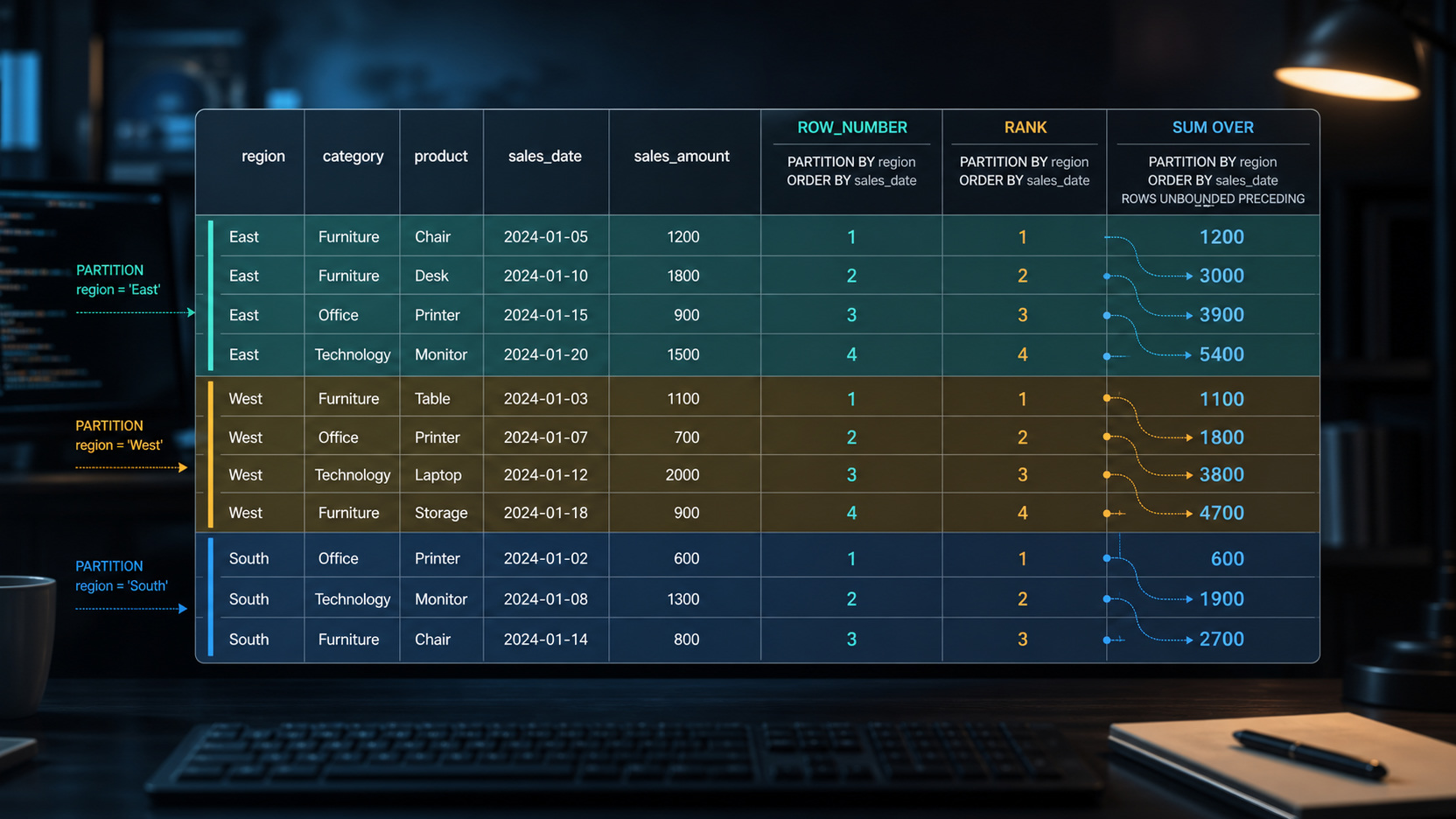
SQL window functions add per-row calculations — rankings, running totals, comparisons to the previous row — without collapsing your result set the way GROUP BY does. If you’ve ever wanted a column that says “rank within this group” while keeping every original row, this guide shows you how to write the patterns you’ll reach for weekly.
OVER(). PARTITION BY (optional) divides rows into independent groups; ORDER BY inside OVER() sets the sort order for ranking and cumulative calculations. Row count never changes.What a window function is (and why it’s not GROUP BY)
GROUP BY collapses rows. Ask for revenue by country and you get one row per country — the individual orders are gone. That’s exactly right for a summary, but not when you also need the row-level detail.
A window function keeps every row and attaches a computed value alongside it. The “window” is the set of rows the function looks at when calculating the current row’s value — the whole result, a group of rows sharing a common column value, or a sliding frame of nearby rows. Window functions never reduce row count.
The anatomy of OVER(): PARTITION BY and ORDER BY
Every window function requires OVER() — that’s the clause that turns an aggregate call into a window calculation. Inside sit two optional pieces:
- PARTITION BY – divides the result into independent groups. The function restarts its calculation for each partition. Omit it and the whole result set is treated as one window.
- ORDER BY (inside
OVER()) – sets the row order within each partition. For ranking functions it determines what gets rank 1; for running totals it sets the cumulative direction.
Three versions of the same function: SUM(amount) OVER() adds the grand total to every row. OVER(PARTITION BY country) adds each country’s subtotal. OVER(PARTITION BY country ORDER BY order_date) builds a running total per country in date order. Same function, three windows.
Ranking rows: ROW_NUMBER, RANK, and DENSE_RANK
All three assign a position to each row within a partition, but they handle ties differently. Two employees scored 90; one scored 85:
| Employee | Score | ROW_NUMBER | RANK | DENSE_RANK |
|---|---|---|---|---|
| Alice | 90 | 1 | 1 | 1 |
| Bob | 90 | 2 | 1 | 1 |
| Carol | 85 | 3 | 3 | 2 |
ROW_NUMBER always produces unique sequential numbers: 1, 2, 3 with no repeats. RANK gives tied rows the same rank and then skips — two rows at 1 means the next rank is 3. DENSE_RANK shares the rank for ties without a gap: two 1s, then 2.
Use ROW_NUMBER when you need exactly one result per group — the worked example below explains why. Use DENSE_RANK when “second place” should mean the second distinct score tier, not the third physical row. All three require ORDER BY inside OVER().
Running totals and moving averages
SUM, AVG, MIN, and MAX all work as window functions. The workhorse is a running total: SUM(amount) OVER(PARTITION BY user_id ORDER BY order_date) gives each row the cumulative spend for that user up to that date.
The default window frame is RANGE BETWEEN UNBOUNDED PRECEDING AND CURRENT ROW. For unique ORDER BY values it works as expected. When two rows share the same date, RANGE treats them as one group and sums both at once, making the running total jump rather than increment row by row. Switching to ROWS BETWEEN UNBOUNDED PRECEDING AND CURRENT ROW processes each physical row individually. Moving averages use the same syntax with a bounded frame: AVG(amount) OVER(ORDER BY order_date ROWS BETWEEN 6 PRECEDING AND CURRENT ROW).
Looking at other rows: LAG and LEAD
LAG(column, n, default) returns the value from n rows before the current row within the window; LEAD does the same forward. Both default to an offset of 1 and return NULL when no prior or following row exists — unless you supply a third argument as the fallback.
The main use is period-over-period comparison without a self-join. LAG(revenue) OVER(PARTITION BY region ORDER BY month) pulls last month’s revenue into the current row, so month-over-month change becomes a simple subtraction in the same SELECT. LEAD works forward — useful for computing time between consecutive events.
Worked example: top-N per group
Selecting the top-N rows per group — latest order per customer, highest score per category — is the most common real-world window pattern. GROUP BY can’t do it cleanly. A CTE with ROW_NUMBER() can: put ROW_NUMBER() OVER(PARTITION BY customer_id ORDER BY order_date DESC) AS rn in the CTE, then filter with WHERE rn = 1 in the outer query. The PARTITION BY restarts numbering for each customer; DESC ordering makes the newest row 1; and because ROW_NUMBER always produces unique values, you always get exactly one row per customer.
The same shape handles de-duplication: partition by the columns that define a duplicate, order by the column that picks the correct copy — a timestamp, a version number — and keep rn = 1.
Common pitfalls to avoid
WHERE can’t filter a window result. Window functions run after WHERE has filtered rows, so WHERE rn = 1 in the same SELECT that defines rn fails. Fix: put the window function in a CTE or subquery and filter in the outer query. Some databases add a QUALIFY clause as shorthand, but it isn’t standard SQL — the CTE is portable.
Default frame surprises. Adding ORDER BY inside OVER() without an explicit frame clause defaults to RANGE BETWEEN UNBOUNDED PRECEDING AND CURRENT ROW. On unique sort values that’s fine; on duplicate sort values it can cause running totals to jump unexpectedly. Writing ROWS rather than RANGE and stating the frame explicitly removes the ambiguity.
Two ORDER BYs, two jobs. ORDER BY inside OVER() controls the window calculation order. ORDER BY at the end of the query controls final output order. They are independent.
Frequently asked questions
Can I use a window function in a WHERE clause?
No — window functions evaluate after WHERE, so they can’t be referenced there directly. Wrap the window function in a CTE or subquery and filter on its output in the outer query. Some warehouse dialects add QUALIFY as shorthand, but it isn’t standard SQL; the CTE approach works everywhere.
What is the difference between RANK and DENSE_RANK?
Both assign tied rows the same rank. RANK then skips the next position — two rows tied at 1 mean the next rank is 3. DENSE_RANK leaves no gap — two 1s are followed by 2. Use DENSE_RANK when you want to count distinct performance tiers; use RANK when position gaps should appear in the output.
Do window functions work in all SQL databases?
All major modern databases support the core window functions covered here — ROW_NUMBER, RANK, DENSE_RANK, LAG, LEAD, and aggregate windows. This includes PostgreSQL, MySQL 8+, SQL Server 2012+, BigQuery, Snowflake, Redshift, and DuckDB. The main exceptions are MySQL pre–8.0 and very early SQLite versions.
When should I use GROUP BY instead of a window function?
Use GROUP BY when you want a summary with fewer rows than the source — totals or counts per category. Use a window function when you need to keep every original row and add a computed column. If a single query needs both — say, a row-level rank and a category total — a CTE for each step combines them cleanly.
Window functions are the upgrade that turns solid SQL into genuinely analytical queries. Once OVER(), PARTITION BY, and ORDER BY feel familiar, the patterns in this guide come quickly. The modern data stack guide sets the context for where these queries run; star schema explained covers the table designs that make window functions especially useful day-to-day.
Last updated: July 6, 2026


Comments
Post a Comment